
PDF to Word — scanned or regular, both work
Get an editable .docx out of your PDF. Text-based pages are extracted directly; scanned pages fall back to local OCR. Everything runs in your browser — nothing is uploaded.
- Upload the PDF
- Local extraction
- Download the .docx
Drop your file here
or choose from your device — no sign-up needed
Files are processed locally in your browser — never uploaded to any server
Full-release pricing preview: $6.9/mo or $49/yr · 30-day email notice before billing starts · nothing is charged during the beta
What the result looks like
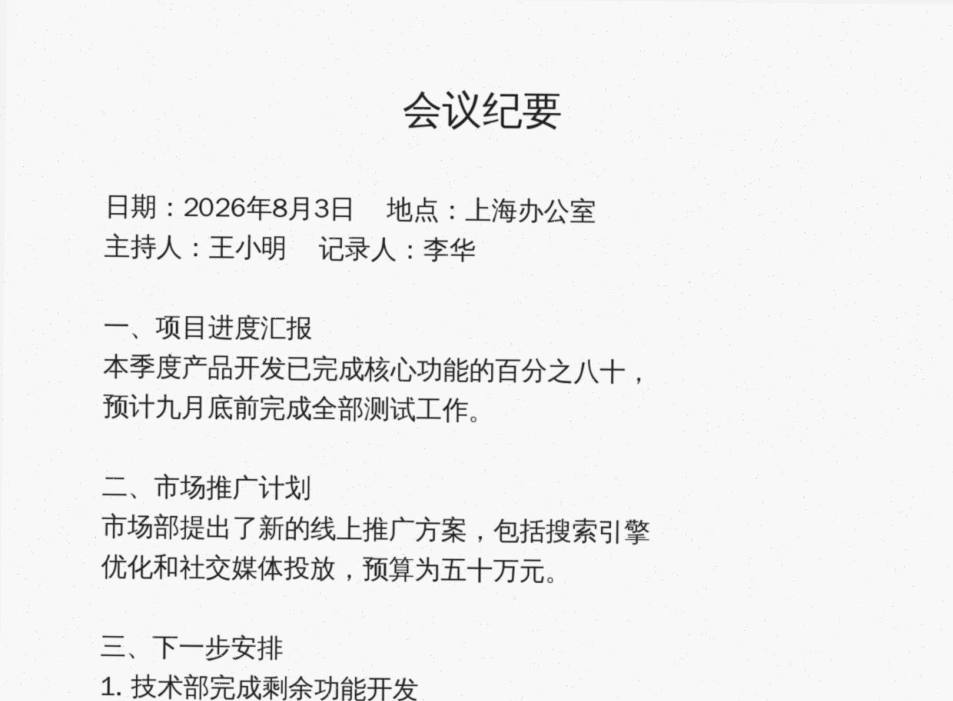
会议纪要
日期: 2026 年 8 月 3 日 ”地点:上海办公室
主持人:王小明 ”记录人:李华
一、项目进度汇报
本季度产品开发已完成核心功能的百分之八十,
预计九月底前完成全部测试工作。
The text above is an unedited excerpt of what our OCR engine actually produced from the sample scan. Click “Try with a sample PDF” above to reproduce it yourself.
How it works (3 steps)
Upload the PDF
Both text-based and scanned PDFs are accepted; scanned pages automatically use OCR.
Local extraction
Text and basic paragraph structure are reconstructed in your browser with visible progress.
Download the .docx
Open in Word or Google Docs and edit. Failed runs are refunded automatically.
Popular searches
- scanned PDF to editable Word
- PDF to docx converter online free
- OCR PDF to Word
FAQ
No converter can promise that. We prioritize clean, editable text with paragraphs; complex multi-column layouts are simplified. We say this up front instead of overpromising.
Try it ↑Yes — pages without a text layer are OCR-ed locally in your browser. Proofread the result; recognition is never perfect.
Try it ↑No. Extraction and OCR both run locally in your browser.
Try it ↑No. Any change to a signed PDF (merging, compressing, watermarking…) invalidates the existing digital signature — that is the tamper-proof design of PDF signatures, not a limit of this site. Process first, then sign.
Try it ↑Yes — and you can verify it: the tool runs on open-source in-browser engines (pdf-lib, pdf.js, Tesseract OCR…) on your own device. Open DevTools → Network while processing and you will see no file upload requests.
Try it ↑Related tools
OCR — PDF to Text
Turn scanned PDFs into selectable, searchable text in 9 recognition languages (Simplified/Traditional Chinese, English, Japanese, Korean, German, French, Spanish, Portuguese) — export .txt or a searchable PDF
Bank Statement PDF to Excel
Upload a bank statement PDF and get a column-aligned .xlsx — date / description / debit / credit / balance exactly as printed, ready for your accounting software
Images to PDF
Merge multiple JPG / PNG images into a single PDF, one image per page